
Your Digital Shopping Bodyguard: The HTTPS Secret! 🛡️💳
Hello, savvy online shoppers! Ready for a game-changing security tip that could save you from becoming a cybercrime victim? Today we're diving deep into the one simple check that protects your money, identity, and peace of mind every single time you shop online! 🚀
This isn't just another tech tip—this is your digital survival guide for the wild world of e-commerce!
The One-Second Security Check That Changes Everything ⚡
Here's the revolutionary technique: Always check for HTTPS before entering ANY payment information!
The Simple Process: 🔍
- Tap the address bar of your web browser (that long box at the top)
- Look at the beginning of the URL that appears
- Verify it starts with "HTTPS" (not just HTTP)
- Only proceed if you see that magical "S"
That's it! One tiny letter that makes an enormous difference in your online security!
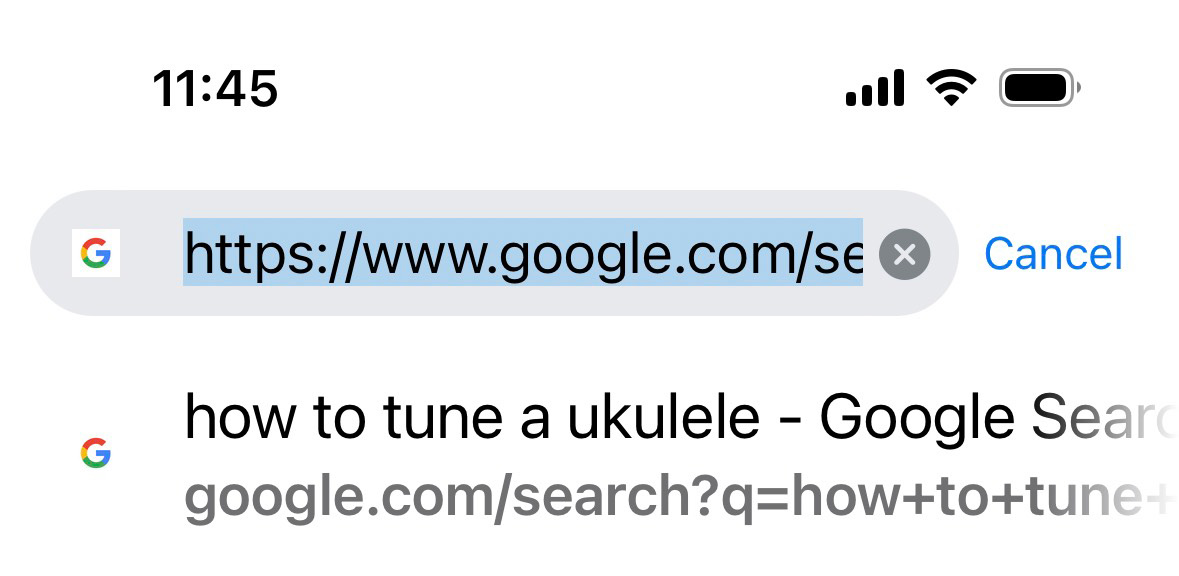
See that "HTTPS" at the beginning? That's your green light to shop safely! 🟢
Why That Little "S" is Your Superhero 🦸♀️
HTTPS vs HTTP: The Battle for Your Data
HTTP (The Risky One) 😰:
- Sends your information completely exposed
- Like shouting your credit card number across a crowded room
- Hackers can easily intercept and steal your data
- NEVER enter payment info on HTTP sites!
HTTPS (Your Digital Guardian) 😎:
- Encrypts all your information before sending it
- Like having a secret conversation in an unbreakable code
- Protects credit cards, passwords, and personal details
- Verifies the website's authenticity
The difference? HTTP is like sending a postcard (everyone can read it), while HTTPS is like sending a locked safe that only you and the website can open! 🔐
The Technical Magic: What HTTPS Actually Does 🧙♂️
HTTPS stands for "HyperText Transfer Protocol Secure"—but let's break that down into human terms:
Your Data's Journey with HTTPS: 🛡️
- Encryption: Your information gets scrambled into unreadable code
- Secure Transmission: The scrambled data travels across the internet
- Authentication: The website proves it's really who it claims to be
- Decryption: Only the legitimate website can unscramble your information
What This Protects: 💎
- Credit card numbers and CVV codes
- Banking information and passwords
- Personal details like addresses and phone numbers
- Login credentials for your accounts
- Any sensitive information you enter
Courtesy of understanding this comes from both experience and AI assistance—but the protection is 100% real!
Red Flags: When NOT to Shop Online 🚩
Immediate Deal-Breakers:
- No HTTPS: If you see only "HTTP" in the URL, run away! 🏃♀️
- Browser warnings: If your browser shows security alerts, listen to them!
- Missing contact information: Legitimate businesses provide clear contact details
- Too-good-to-be-true prices: If it seems impossible, it probably is
- Poor website design: Professional businesses invest in professional websites
- No reviews or testimonials: Established businesses have customer feedback
Suspicious URL Patterns: 🕵️♀️
- Weird spelling of famous brands (like "amaozn" instead of "amazon")
- Random letters and numbers in domain names
- Unfamiliar country extensions for local businesses
- URLs that don't match the claimed business name
Beyond HTTPS: Complete Online Shopping Security 🛡️
The Complete Security Checklist: ✅
- ✅ HTTPS verified before any payment entry
- ✅ Trusted payment methods (PayPal, major credit cards)
- ✅ Recognized merchant or verified marketplace seller
- ✅ Updated browser with current security features
- ✅ Secure network (avoid public Wi-Fi for payments)
- ✅ Strong passwords for shopping accounts
Advanced Protection Strategies: 🎯
- Virtual credit card numbers: Many banks offer these for online shopping
- Two-factor authentication: Enable it for all shopping accounts
- Regular account monitoring: Check statements and account activity frequently
- Dedicated shopping email: Use a separate email for online purchases
- VPN usage: Extra encryption layer when shopping on public networks
Shopping Platform Specific Tips 🛒
For Major E-commerce Sites (Amazon, eBay, etc.):
- Look for the official domain name exactly
- Check for seller ratings and reviews
- Use the platform's buyer protection policies
- Enable account security features
For Independent Online Stores:
- Research the business before shopping
- Look for physical business addresses
- Check Better Business Bureau ratings
- Read customer reviews on multiple sites
For New or Unknown Sites:
- Start with small test purchases
- Pay with credit cards (better fraud protection than debit)
- Screenshot your orders and confirmations
- Research the business thoroughly
The Psychology of Online Shopping Security 🧠
Why People Skip Security Checks:
- Convenience over caution: We want to shop quickly
- False sense of security: "It won't happen to me" thinking
- Lack of awareness: Not understanding the real risks
- Urgency tactics: Limited-time offers create pressure to skip checks
Building Better Habits: 💪
- Make HTTPS checking automatic: Train yourself to always look
- Slow down: Take 30 extra seconds for security checks
- Question urgency: Real deals will wait for you to be safe
- Value your information: Treat your data like cash
Mobile Shopping Security 📱
Extra Mobile Considerations:
- App vs. Browser: Official apps often provide better security
- Network awareness: Avoid shopping on public Wi-Fi
- App updates: Keep shopping apps updated for security patches
- Screen lock: Protect your device if it's lost or stolen
What to Do If You've Been Compromised 🆘
Immediate Actions:
- Contact your bank/credit card company immediately
- Change all related passwords on affected accounts
- Monitor accounts closely for unusual activity
- File fraud reports with appropriate authorities
- Document everything for insurance and disputes
Prevention for Next Time:
- Review what went wrong and how to avoid it
- Strengthen security practices based on the experience
- Consider identity monitoring services
- Share your experience to help others learn
The Economic Impact: Why This Matters 💰
Personal Financial Protection:
- Average identity theft cost: $1,100 per victim
- Time to resolve: Often 6+ months of stress and paperwork
- Credit impact: Can affect loans, mortgages, and employment
- Peace of mind: Priceless!
Supporting Ethical Businesses:
When you shop securely, you support businesses that invest in customer protection, encouraging better security practices across the industry.
Your Secure Shopping Action Plan 🎯
Starting Today:
- Bookmark this guide for reference
- Check all your current shopping sites for HTTPS
- Update your browser to the latest version
- Enable security features on all shopping accounts
- Share this knowledge with friends and family
Monthly Security Maintenance:
- Review credit card and bank statements
- Update passwords on shopping accounts
- Check for unauthorized accounts or changes
- Clear browsing data and cookies
The Community Effect: We're All In This Together 🤝
When you practice secure online shopping, you're not just protecting yourself—you're contributing to a safer digital marketplace for everyone! Cybercriminals target easy victims, so the more secure we all become, the less profitable their schemes become.
Final Thoughts: Your Digital Shopping Superpower ✨
Learning to spot HTTPS and shop securely isn't just about avoiding problems—it's about empowering yourself to enjoy the incredible convenience of online shopping with complete confidence!
Remember the golden rule: When in doubt, don't enter your payment information. A few extra minutes of verification can save you months of fraud resolution stress!
Your new superpower: The ability to shop online safely, confidently, and enjoyably, knowing you're protected by both technology and knowledge!
Have you ever encountered a non-HTTPS shopping site? What other security tips have saved you from online shopping disasters? Let's build a community of secure shoppers together! 🛒🛡️✨